
A Smarter Work Hours Calculator
for Faster, More Accurate Payroll
Calculate employee work hours, lunch deductions, overtime, double time and optionally enable gross-pay calculations using the free TimeWorkz Time Card Calculator Easily, Calculate Hours and Minutes Worked.
Unlike basic online time card calculators, this advanced Work Hours Calculator includes configurable payroll calculation options, multiple hour formats, printable time card report, and demonstrates how modern employee time clocks automatically calculate employee hours for payroll.
You've manually calculated the hours—now discover how Time Card Calculators work, how payroll hours are calculated, and why modern employee time clocks eliminate manual calculations.
Learn More About Time Card Calculators
What is
a Time Card Calculator?
A Time Card Calculator is a tool that automatically calculates employee work hours using clock-in and clock-out times. It totals regular hours, overtime, double time, break or lunch deductions, and can optionally calculate gross pay for payroll processing. Businesses use time card calculators to improve payroll accuracy, reduce manual calculations, and save time when preparing employee time cards and payroll reports.
While many online calculators require users to manually enter employee work hours, modern employee time clocks perform these calculations automatically as employees clock in and clock out. Understanding how a Time Card Calculator works can help businesses choose the best solution for accurate employee time tracking and payroll management.
How Does
it Work?
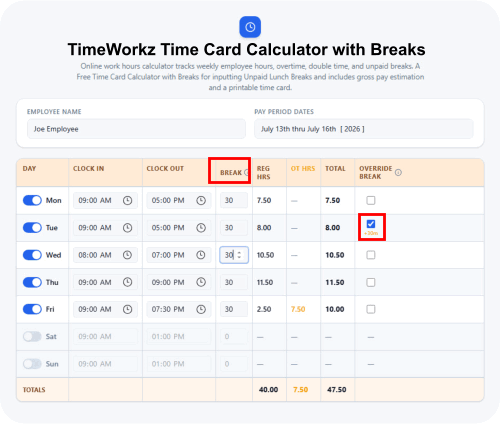
1. Enter Clock-In and Clock-Out Times
The employee's starting and ending work times are entered into the calculator. Some systems also allow multiple clock-in and clock-out periods during the same day for split shifts or multiple breaks.
2. Calculate Regular, Overtime, and Double Time
The calculator totals regular work hours and, when configured, automatically calculates overtime and double time based on your company's payroll rules and labor requirements.
3. Deduct Unpaid Lunch and Break Times
The Work Hours Calculator must deduct for unpaid Lunch periods from the total hours worked, ensuring payroll calculations accurately reflect actual working time.
4. Input Missed Punches for employees that forgot to Clock-In and Clock-Out
One very important step, is the data correction for employees with Missing Punches. If the system has a missing Clock In or missing Clock Out, the Time Card Calculator cannot produce accurate work hour calculations. Some automated Time Clocks, equip their time card calculator software with a powerful tool to detect and flag the Time Card Editor, showing the payroll clerk only those employees with missed punch exceptions. Next, the missed punch transactions are manually inputted and the Time Card Calculator will automatically update the total hours for each Time Card.
5. Generate a Time Card Report for Employee Payroll Totals
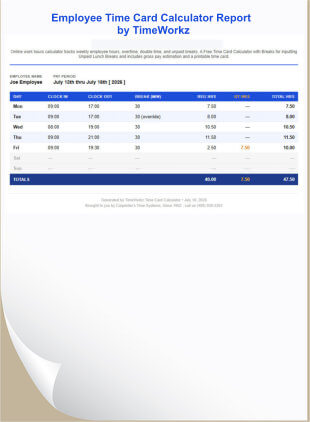
The final results display total hours worked, regular hours, overtime, double time, and optional gross pay calculations. Many calculators also generate basic printable time card reports that can be used during payroll processing.
Manual Time Card Calculator
vs. an Automatic Employee Time Clock
A manual Time Card Calculator is an excellent tool for calculating employee work hours, overtime, and payroll totals. However, because work hours must still be entered manually, the payroll process can become time-consuming and more susceptible to data entry errors as your workforce grows. An automatic Employee Time Clock records employee punches and performs these calculations automatically, helping businesses save time while improving payroll accuracy.
For small businesses with only a few employees, a manual Time Card Calculator may be all that's needed. As organizations grow, however, many choose an Employee Time Clock with a built-in Time Card Calculator to automate payroll calculations, reduce administrative work, and improve overall timekeeping accuracy.
Make it easy for your Payroll Clerk and Timekeeper Staff to Calculate Hours and Minutes Worked.
Employee Time Clocks
with Built-In Time Card Calculators
An Employee Time Clock with a built-in Time Card Calculator combines employee clock-in and clock-out recording with automatic work-hour calculations. Instead of manually entering punches into a separate calculator, employee transactions are recorded by the time clock and automatically processed into Regular Hours, Overtime and payroll-ready totals.
This approach can significantly reduce the time required to prepare employee Time Cards while elminating repetitive calculations and reducing manul data entry. Depending on the system, employees may clock in using face recognition, fingerprint identification, proximity badges, PIN numbers, and other methods such as QR Codes encrypted on the employee's smartphone.
View TimeWorkz Employee Time Clocks below
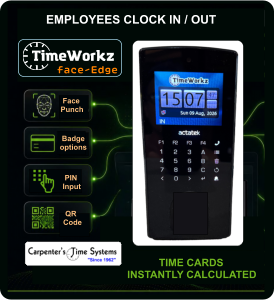
TimeWorkz faceEdge
Face Recognition Time Clock
The TimeWorkz faceEdge is equipped with unique features not found in other employee time clocks. No Software to install, because the Time Card Calculator is built-in to the device.
Payroll Clerks, Timekeepers can log-in via any browser from a network connected desktop PC or Tablet, to perform Editing of Missed Punches, process and Print Time Card Reports, etc..
Employees can Clock-In and Clock-Out directly via the device's Face Recognition Time Clock, assuring management of accurate time tracking and recording with piece of mind that employee Buddy-Punching cannot occur.
View Details
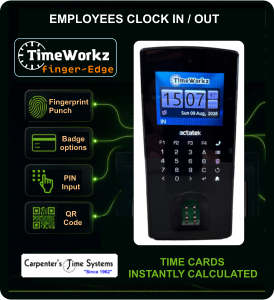
TimeWorkz fingerprintEdge
Fingerprint Time Clock
Choose the TimeWorkz fingerEdge Fingerprint Time Clock for accurate Time Recording of Employee's Clock-In and Clock-Out via a Fingerprint Reader instead of Face.
To further emphasize, all the models of our TimeWorkz Edge line of Employee Time Clocks come equipped with internal web-server for the Time Card Calculator engine, and the interface for management functions is accessed via any Web Browser, such as Google Chrome, Microsoft Edge, Firefox and apple computers via the Safari browser.
The TimeWorkz Edge employee time clocks also support Two other standard methods for Clock-In / Clock-Out via PIN Number entry, or punching via QR Code (via encrypted QR Code stored inside the employee's Smartphone, for a badge-less method)
View Details